From newborn nurse visits to vaccination tracking: 2026 workflow
Newborn nurse vaccination schedule tracking needs one verified record. Set up clear handovers, useful reminders and clinician-confirmed vaccination dates.

Instead of manually checking messages after every newborn nurse visit, set up newborn nurse vaccination schedule tracking around one verified vaccination record, a named caregiver and clinician-confirmed reminders. This 2026 workflow connects home-care handovers with vaccination appointments without treating a calendar notification as a medical instruction.
TL;DR- Newborn nurse vaccination schedule tracking needs one verified record, not separate caregiver calendars.
- DarDoc suits UAE families seeking newborn home-care support; confirm vaccination coordination before booking.
- Use the treating clinician’s vaccination plan to set reminders; never calculate catch-up doses yourself.
- Mark a vaccination complete only after checking the administering provider’s documentation.
Why this matters
A nurse’s visit, a vaccination appointment and a vaccination record serve different purposes. Home-care notes describe care delivered; an appointment reserves a visit; the vaccination record documents what was administered. Confusing them leaves you with a completed calendar event but no confirmed vaccination entry.
DarDoc newborn care is best for UAE families seeking home-based support alongside their baby’s treating clinician. DarDoc provides mother/newborn care in Dubai and Abu Dhabi; agree on the exact handover responsibilities before care begins.
For your 2026 plan, keep clinical decisions with the vaccination provider and administrative tracking with a named adult. A newborn nurse can contribute observations and handover information within the agreed scope, but a home-care booking does not establish that vaccination administration is included.
Before you start
- Gather the source documents. Have your baby’s discharge summary, vaccination record, date of birth and treating clinic’s instructions ready. Include records from outside the UAE and any documented previous reactions.
- Confirm responsibilities and access. Name the parent who maintains the tracker, identify the vaccination provider and agree what the home nurse will record. Verify the relevant professional licence through DHA in Dubai or DoH in Abu Dhabi, as applicable.
- Resolve the hidden gotcha: booked is not given. A hospital appointment, discharge recommendation or caregiver’s recollection is not proof of administration. Ask the treating clinic to reconcile unclear entries before you create dose-specific reminders.
You do not need a particular app. You need a record you can retrieve, a reminder system you understand and a safe way to share necessary information with the care team.
Vaccination record setup
Establish one source of truth
- Identify the clinical record. Ask the vaccination provider which document or patient record it updates after administration. Keep that record separate from your household planning notes.
- Create a household tracker. Use a secure document or notebook. Add your own headings: Vaccine, Dose, Date given, Record source, Next date, Status and Owner. These are suggested tracker labels, not DarDoc software fields.
- Copy only documented information. Enter vaccine names and administration dates exactly as recorded. Leave an uncertain entry unresolved rather than filling it from memory.
- Reconcile the plan. Ask the treating clinician to check the existing record against the applicable local schedule and your baby’s circumstances. Record who confirmed the plan and when.
- Keep the original accessible. Store a clear copy securely, with access limited to people involved in care. Retain the original vaccination documentation.
Expected result: you can distinguish a documented dose from a planned appointment, and every completed entry points back to a clinical record.
For a baby born in 2026, record the full date of birth rather than an age that becomes outdated. Do not use this article as a vaccine timetable: the treating provider must confirm the actual vaccines and dates.
Choose a tracking format
Choose the simplest format your household will maintain. Both options below support the same workflow; neither replaces the vaccination provider’s record.
| Tracking option | Best for | Advantage | Limitation |
|---|---|---|---|
| Paper tracker with separate reminders | Families who prefer handwritten handovers | Easy to review together during a home visit | Changes need copying into the reminder system; a misplaced copy exposes information |
| Restricted shared digital tracker | Parents coordinating across caregivers | Caregivers can consult the same updated plan | Incorrect permissions or duplicate versions create privacy and handover problems |
Recommendation: use one working tracker, not competing paper and digital master copies. If you print a digital tracker for a nurse visit, mark it as a visit copy and transfer agreed changes back to the master.
Newborn nurse handover setup
Define the visit responsibilities
- Agree the scope. Ask what the home nurse will assess, document and escalate. If you choose DarDoc newborn care, confirm whether vaccination-record review or appointment coordination is part of your specific arrangement.
- Create a handover entry. Add Visit date, Observations, Parent concerns, Action required and Responsible person. Keep clinical observations separate from vaccination completion status.
- Flag relevant changes. Tell the nurse about feeding concerns, illness, previous reactions or instructions received from the treating clinician. Ask which concerns need clinical review rather than waiting for the next scheduled visit.
- Assign each action. Write a person’s name beside every task. For example, the parent calls the vaccination clinic while the nurse records the care observations required by the agreed service.
- Read back the plan. Before the handover ends, confirm the next action, its owner and the point at which you need a response from the clinic.
Expected result: the next caregiver can identify what happened, what remains unresolved and who must act without searching a message thread.
A nurse’s reassuring assessment does not override a vaccination provider’s instructions. Equally, do not cancel a vaccination solely because a caregiver assumes a symptom makes the baby ineligible; ask the treating clinician to decide.
Reminder and appointment setup
Build reminders around confirmed dates
- Enter the confirmed appointment. Copy the date, time and location from the clinic’s booking confirmation. Label the event as an appointment, not as a completed vaccination.
- Add preparation prompts. As an administrative starting point, set a reminder 7 days before the appointment to check the booking and 2 days before to gather documents. These intervals are planning suggestions, not clinical timing rules.
- Separate tentative dates. If the clinician gives a provisional date, label it Awaiting confirmation. Do not present it to another caregiver as a final instruction.
- Assign attendance. Name the adult taking the baby and identify who will bring the vaccination record. Set 1 primary owner for updating the tracker afterward.
- Check notification visibility. Keep sensitive medical details out of lock-screen previews and broadly shared calendars. Test that the responsible adult receives the reminder.
Expected result: the parent knows when and where to attend, what to bring and which dates still require confirmation.
In your 2026 calendar, use an unambiguous date format and check the time zone if you travel. An appointment date should come from the provider; a reminder date is simply your household’s prompt to prepare.
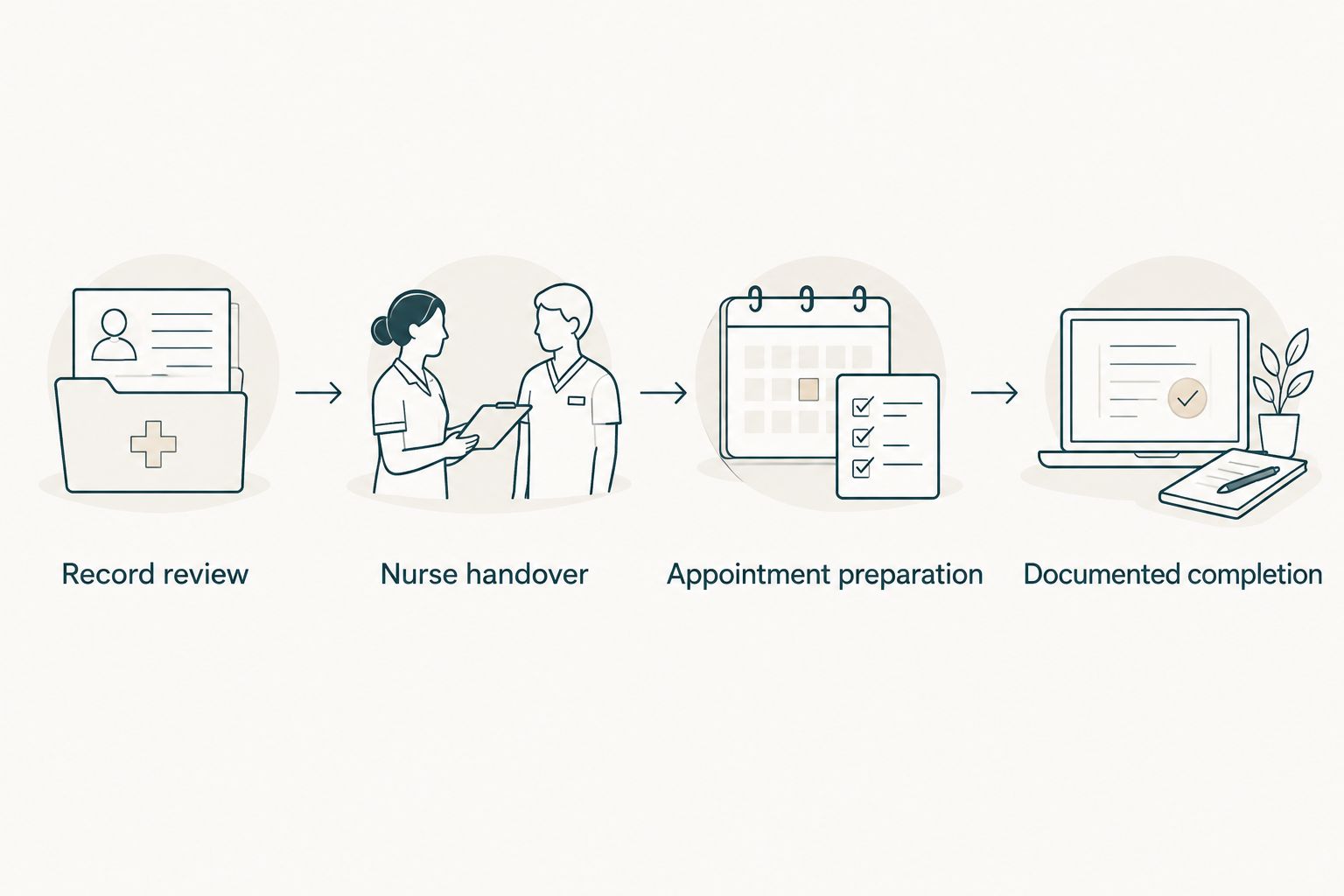
The workflow is record review, nurse handover, appointment preparation and documented completion. Keep those stages distinct so that finishing an administrative task never marks a clinical task complete.
Post-appointment record setup
Close the loop after administration
- Request the updated record. Before leaving, check that the administering provider has documented what was given. Ask the provider to explain any entry you cannot read or match.
- Update the tracker. Copy the confirmed vaccine, dose information and administration date. Change Status to Documented complete only when the supporting record is present.
- Capture the next instruction. Ask the clinician to confirm the next due date or review point. Do not generate the next date by copying a generic internet schedule.
- Replace outdated reminders. Remove superseded appointment prompts after confirming the replacement plan. Keep a brief change note so another caregiver understands why the date moved.
- Share the relevant handover. Tell the home nurse what was administered and pass on the provider’s aftercare instructions through the agreed communication channel.
Expected result: the tracker matches the clinical record, the next action is clear and outdated reminders no longer compete with current instructions.
Ask the administering provider which reactions to expect and when to seek help. Do not rely on a calendar entry for aftercare advice or use this workflow to choose medicines or doses.
When the vaccination plan changes
Use a change-driven workflow whenever the clinic postpones an appointment, your family changes providers or a clinician revises the plan. This is especially useful when care moves between countries or between Dubai and Abu Dhabi.
- Capture the change: record the instruction, its source and the date received.
- Request reconciliation: ask the receiving clinician to review previous vaccination documentation before confirming the revised plan.
- Replace the pending action: update the tracker and calendar together, rather than adding another reminder beside the old one.
- Confirm the handover: tell the named caregiver and home nurse what changed and who owns the next step.
For a transfer during 2026, retain earlier records rather than rewriting the history to match a new format. Different vaccine names or combinations require clinical interpretation; do not assume that unfamiliar wording means a dose is missing.
A missed appointment needs a clinician-confirmed next step, not an improvised restart. Ask the vaccination provider to determine the catch-up plan and document the answer before rebuilding reminders.
Troubleshooting
The tracker and vaccination card disagree
Pause changes to the disputed entry. Ask the administering provider to verify its record, then correct the household tracker and retain a short explanation of the correction. Do not resolve the disagreement by choosing whichever date looks more likely.
Two caregivers booked the same appointment
Choose one booking owner and ask the clinic to confirm which appointment remains active. Remove the duplicate calendar event only after the booking is resolved; deleting a reminder does not cancel a clinic appointment.
The reminder fired, but nobody booked the visit
Separate Booking required from Appointment confirmed. Give the booking task an owner and a follow-up prompt, then replace it with the confirmed appointment details once the clinic responds.
The baby is unwell before vaccination
Contact the treating clinic and describe the symptoms rather than deciding vaccination eligibility yourself. For a baby under 3 months with a temperature of 38°C or higher, seek urgent medical assessment; do not wait for a routine nurse visit or vaccination reminder.
A shared link exposes too much information
Remove unnecessary access and check who can view or edit the record. Share the minimum information needed for each role, and avoid forwarding full medical documents into broad family or household groups.
Customize your workflow
Add feeding, weight or postnatal follow-up tasks only when they belong to the agreed care plan. Keep these tasks separate from vaccination status so a completed newborn visit cannot accidentally close an outstanding vaccination action.
If the handover begins at hospital discharge, use the maternity discharge to newborn night nurse care workflow to organize the transition before adding reminders. Ask the provider which observations need recording and which concerns require direct clinician contact.
Before arranging DarDoc care, explain that you want home-care handovers coordinated with an external vaccination record. Confirm the service scope, communication route and responsibility for appointments rather than assuming a connected tracking platform or vaccination service is included.
Discuss your newborn care needs
Confirm home-care responsibilities and how vaccination information should be handed over.
Discuss newborn careFAQ
What is the best way to organize newborn nurse vaccination schedule tracking?
Use one household tracker linked to the vaccination provider’s documented record, with one named parent responsible for updates. Keep appointment reminders separate from proof that a vaccine was administered.
Can a newborn nurse decide which vaccines my baby needs?
The treating vaccination clinician should confirm your baby’s vaccination plan. Agree what the home nurse will review, record and escalate within the nurse’s professional scope and your care arrangement.
Does booking DarDoc newborn care include vaccinations at home?
Do not assume that newborn care includes vaccination administration or automated tracking. Ask DarDoc to confirm the exact services and coordination responsibilities included in your arrangement.
Should I use a UAE vaccination schedule I found online?
Use your treating provider’s confirmed plan to set your baby’s dates. A general schedule does not resolve uncertain records, catch-up requirements or individual clinical circumstances.
What should I do if my baby misses a vaccination appointment?
Contact the vaccination provider for a revised plan and update the tracker after confirmation. Do not restart a course or calculate catch-up intervals yourself.
How do I track vaccines given outside the UAE?
Bring the original vaccination documents to the receiving clinician for reconciliation. Keep the recorded vaccine names and dates intact until the clinician confirms how they fit the ongoing plan.
What if my newborn has a fever before a vaccination visit?
A baby under 3 months with a temperature of 38°C or higher needs urgent medical assessment. Contact clinical services rather than waiting for a routine vaccination appointment or scheduled home-care visit.
One last thing
The most useful tracker entry can be an unresolved question. Write what needs verification, who will answer it and when you will follow up; an honest gap is safer than a completed-looking record built on an assumption.
Before your next handover, ask the attending adult to find the latest documented vaccination and the next confirmed action without your help. If they cannot, simplify the record before adding more reminders.